
用户

手册

user-guide

用户

手册

A simple character with a round head and orange body holding an open book, focusing on reading.
user-guide
user-guide
Gray downward arrow icon.

快速了解

Gray downward arrow icon.

基础操作

Gray downward arrow icon.

插入主题元素

Gray downward arrow icon.

调整导图样式

Gray downward arrow icon.

调整全局格式

Gray downward arrow icon.

查看与显示

Gray downward arrow icon.

文件

Gray downward arrow icon.

分享

Gray downward arrow icon.

协作与同步

Gray downward arrow icon.

AI 功能

Gray downward arrow icon.

更多模式与功能

Gray downward arrow icon.

常见问题解答

/

/

苹果应用商店订阅激活

苹果应用商店订阅激活

如何激活在 iOS 应用商店中的订阅?

  1. 启动 Xmind iOS版

  2. 进入设置

  3. 使用您的 Xmind 账号登录

  4. 点击恢复购买

https://support.xmind.net/hc/article_attachments/24265508674457

如果在执行上述步骤后您的账户仍然处于试用状态,请联系我们并在提交的工单中提供以下详细信息。

  1. 附上购买收据作为购买证明

  2. 截取恢复购买时出现的错误截图

  3. 告知我们您的 Xmind ID(不是Apple ID)

  4. 在 Xmind iOS版中发送反馈(设置 > 反馈

如何激活在 MacOS 应用商店中的订阅?

  1. 从应用商店下载最新版本的 Xmind

  2. 点击 Xmind > 升级至Pro > 恢复购买

https://support.xmind.net/hc/article_attachments/24265508681113

  1. 如果无法恢复购买,请尝试退出并重新登录您的 Apple ID,然后再尝试上述步骤。

  • 选择Apple 菜单  > 系统偏好设置

  • 点击Apple ID,然后点击概览(如果您使用的是 macOS High Sierra 或更早版本,请点击 iCloud

  • 点击退出登录

如果在执行上述步骤后您的账户仍然处于试用状态,请联系我们并在提交的工单中提供以下详细信息。

  1. 附上购买收据作为购买证明

  2. 截取恢复购买时出现的错误截图

  3. 告知我们您的 Xmind ID(不是Apple ID)

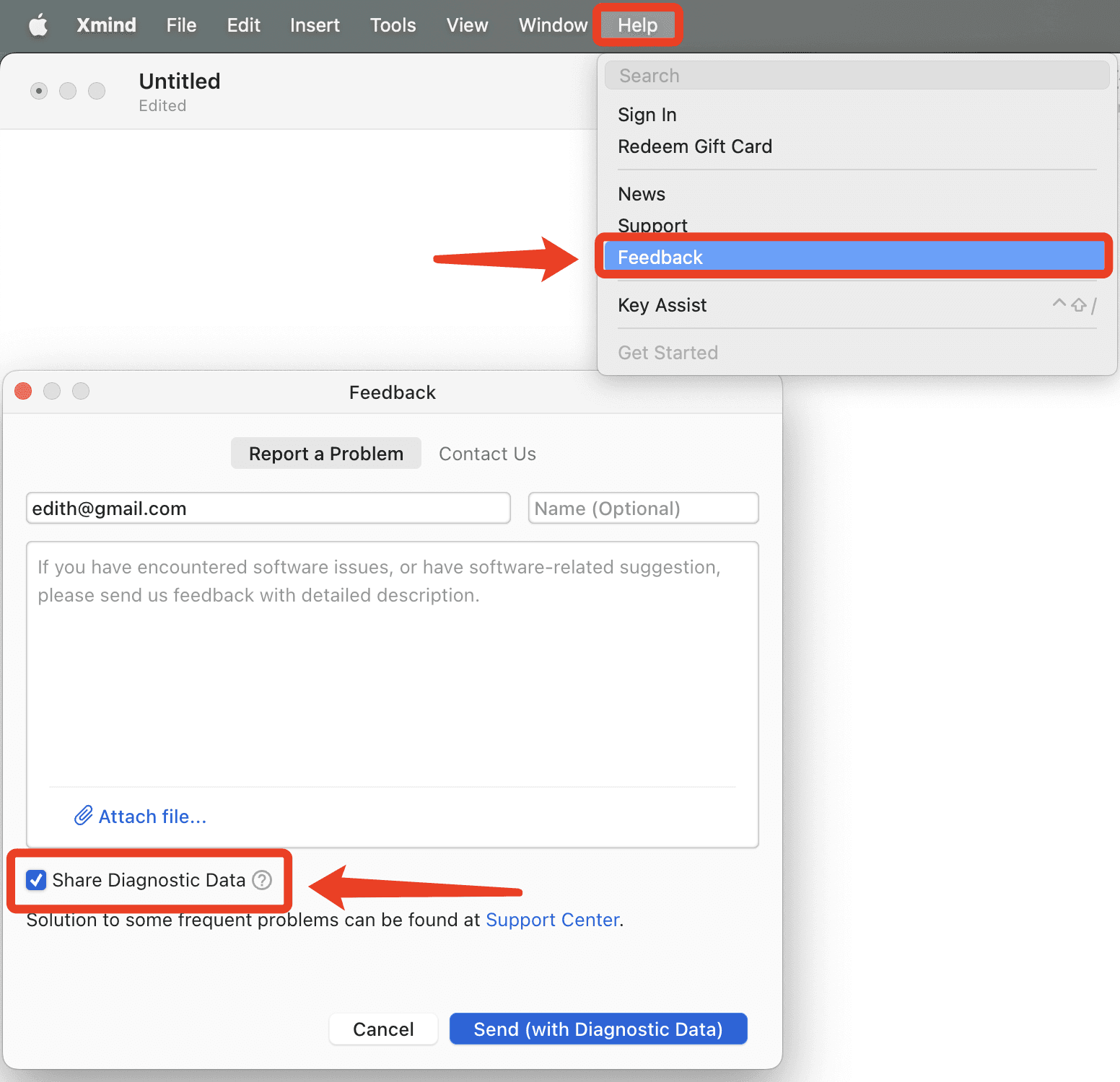
  4. 在 Xmind 桌面端中发送反馈(帮助 > 反馈),我们需要获取日志文件来检查问题。
https://support.xmind.net/hc/article_attachments/24265536603289
